Beginner Arduino Projects
Arduino WS2812B LED Strip Interfacing – Control Addressable RGB LEDs
Try it yourself
Open the live circuit and code — run it right in your browser.
You'll be asked to sign in first — it's free.
🎯 Aim
Learn how to interface a WS2812B addressable RGB LED strip with an Arduino Uno and control individual LEDs using the Adafruit NeoPixel library. In this project, two 8-LED WS2812B strips are daisy chained to create a 16-LED addressable strip with a single Arduino data pin.
📖 Background Story
Ordinary LEDs are usually controlled one at a time using a separate Arduino output, or multiple pins when controlling an RGB LED. Addressable LEDs such as the WS2812B make things much more interesting.
A WS2812B LED contains an RGB LED and a tiny controller inside the same package. This means every LED in the strip can be controlled independently, while the Arduino only needs a single data signal.
This project explores that idea by connecting two 8-LED WS2812B strips together. The data output of the first strip is connected to the data input of the second strip, creating a chain of 16 individually addressable LEDs.
The Arduino sends the complete sequence of LED colors through the data line. Each WS2812B LED takes the portion of the data intended for it and passes the remaining data along the chain.
This is called daisy chaining, and it is one of the most useful concepts to understand when working with addressable LEDs.
Instead of treating the LEDs as separate components, we can think of the two strips as one continuous 16-LED display.
In this project, the Arduino moves a red pixel from the first LED to the last LED. Once it reaches the end, the animation starts again.
The same basic technique can later be used to create color patterns, animations, LED indicators, lighting effects, rainbows, and interactive visual displays.
🧰 Components Used
- ● Arduino Uno R3
- ● WS2812B LED Strip – 16 LEDs
- ● 5V DC Power Supply
🔌 Circuit Diagram
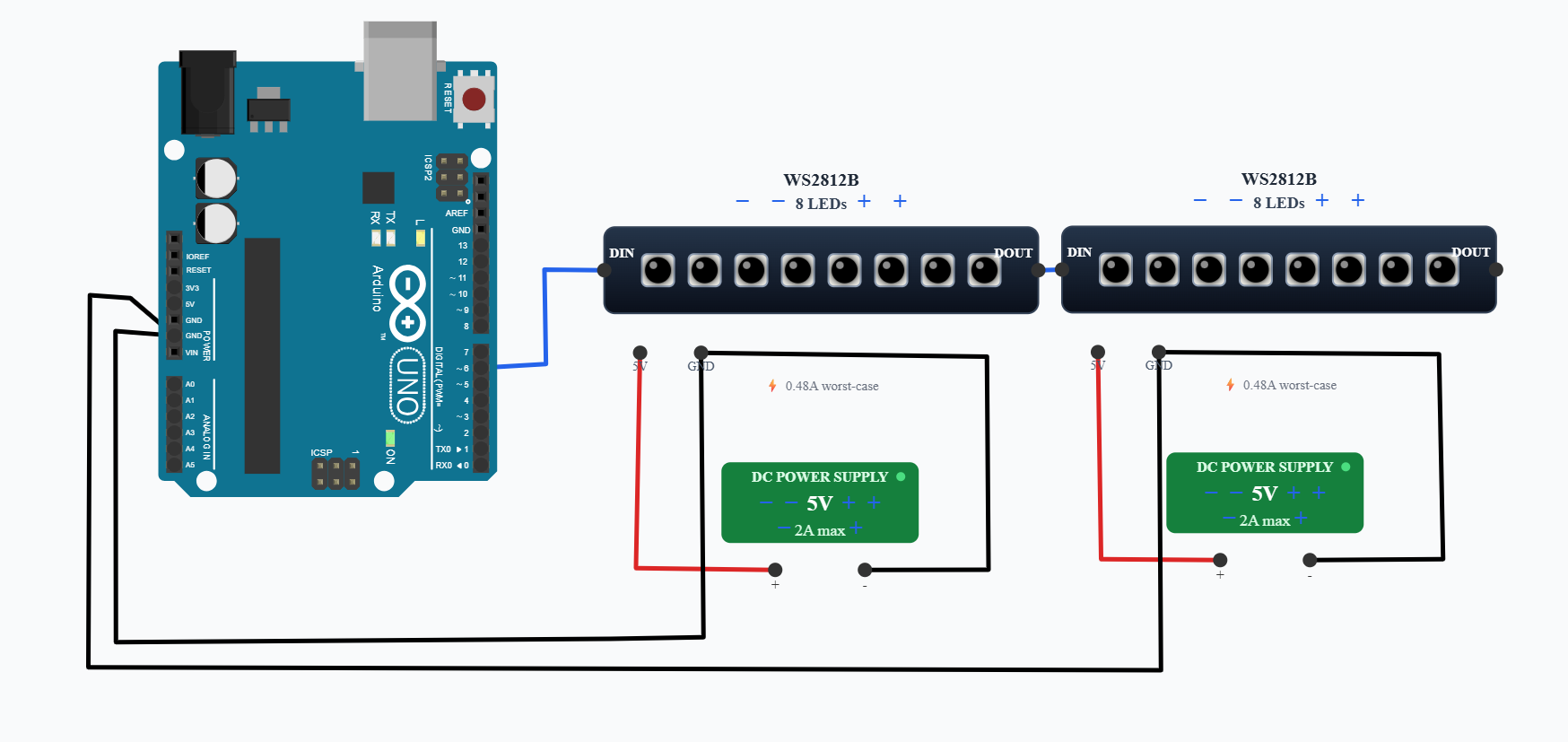
Connect Arduino Uno digital pin D6 to the DIN (Data In) pin of the first WS2812B strip.
Connect the DOUT (Data Out) of the first WS2812B strip to the DIN of the second WS2812B strip. This creates a daisy chain containing 16 addressable LEDs.
Power the WS2812B strips from a 5V supply. In the simulated circuit, each 8-LED strip is connected to its own 5V DC power supply.
Connect the grounds of the WS2812B strips and the Arduino together to provide a common ground reference.
The Arduino therefore needs only one digital data pin to control all 16 LEDs.
💻 Code
#define LED_PIN 6
#define LED_COUNT 16

Adafruit_NeoPixel strip(
  LED_COUNT,
  LED_PIN,
  NEO_GRB + NEO_KHZ800
);

void setup() {
  strip.begin();
  strip.setBrightness(1000);
  strip.show();
}

void loop() {
  for (int i = 0; i < LED_COUNT; i++) {
    strip.clear();
    strip.setPixelColor(i, strip.Color(255, 0, 0));
    strip.show();
    delay(150);
  }
}
💬 Comments (0)
Sign in to leave a comment.
Be the first to comment on this project.