Beginner Arduino Projects
TCS3200 Color Sensor with Arduino – Measure Red, Green and Blue
Try it yourself
Open the live circuit and code — run it right in your browser.
You'll be asked to sign in first — it's free.
🎯 Aim
Interface a TCS3200 color sensor with Arduino Uno and read the intensity of red, green and blue color components using the sensor's frequency output.
📖 Background Story
Colors are everywhere in the physical world, but how can an electronic system recognize them?
The TCS3200 is a programmable color sensor that converts the intensity of different colors of light into a frequency signal. By selecting different internal color filters, an Arduino can measure the red, green and blue components of the detected light.
In this project, we will connect a TCS3200 color sensor to an Arduino Uno and read the sensor's output using pulse timing. Arduino selects the required color filter, measures the output pulse and converts the measured frequency into a convenient 0–255 value.
This project introduces the fundamentals of color sensing, frequency-based sensors, pulse measurement and sensor data processing.
🧰 Components Used
- ● Arduino Uno R3
- ● TCS3200 Color Sensor
- ● Color Block / Colored Object
- ● Connecting Wires
🔌 Circuit Diagram
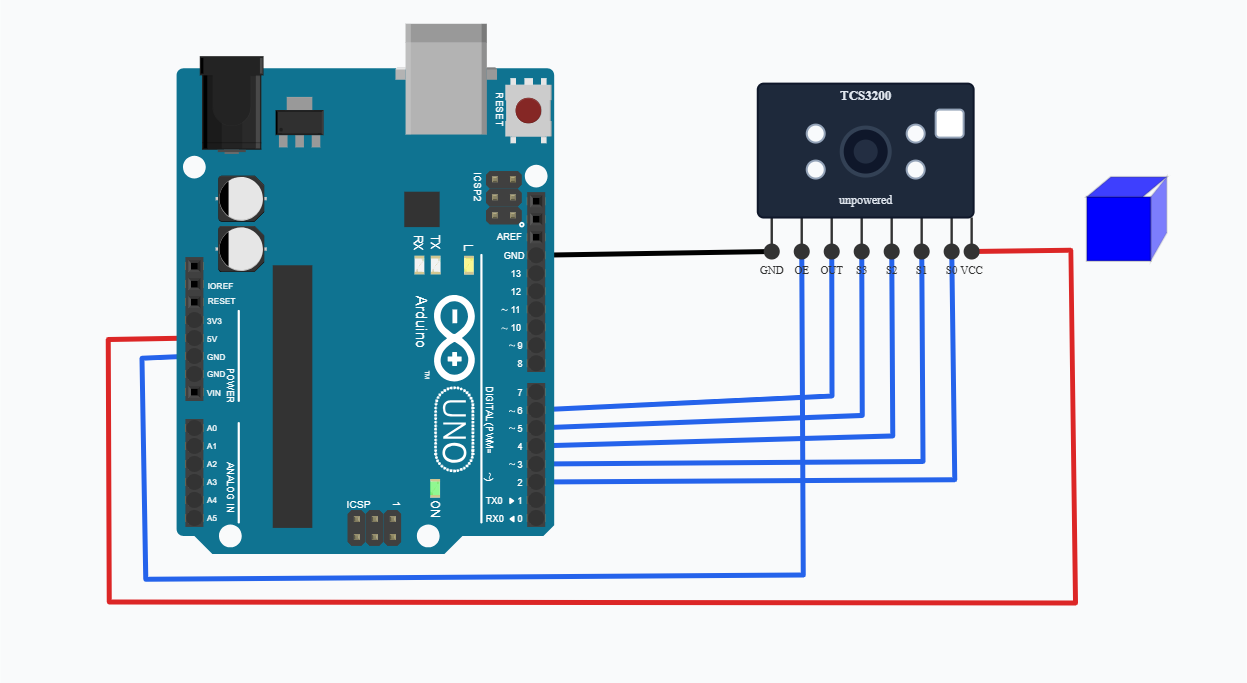
The TCS3200 color sensor is connected to the Arduino Uno using five digital pins. The Arduino controls the sensor's color-filter selection through the S0, S1, S2 and S3 pins and reads the frequency output from the sensor through the OUT pin.
For this project, the connections are:
S0 → Arduino D2
S1 → Arduino D3
S2 → Arduino D4
S3 → Arduino D5
OUT → Arduino D6
VCC → Arduino 5V
GND → Arduino GND
The S0 and S1 pins configure the frequency scaling of the sensor. In this project, S0 is set HIGH and S1 is set LOW, which configures the sensor for 20% frequency scaling.
The S2 and S3 pins select which color filter is used by the sensor. Arduino changes these two pins to measure the red, green, blue and clear channels.
The TCS3200 produces a frequency signal on its OUT pin. Arduino measures the duration of this signal using pulseIn() and converts the measurement into a value between 0 and 255.
The color block in the Brainy Circuits simulator provides the virtual colored object that the TCS3200 detects. Changing the color of the block changes the sensor readings, allowing you to experiment with color detection interactively.
💻 Code
#define S0 2
#define S1 3
#define S2 4
#define S3 5
#define OUT 6

void setup() {
  pinMode(S0, OUTPUT);
  pinMode(S1, OUTPUT);
  pinMode(S2, OUTPUT);
  pinMode(S3, OUTPUT);
  pinMode(OUT, INPUT);

  // 20% frequency scaling
  digitalWrite(S0, HIGH);
  digitalWrite(S1, LOW);

  Serial.begin(9600);
}

int readChannel(bool s2, bool s3) {
  digitalWrite(S2, s2);
  digitalWrite(S3, s3);
  delay(10); // let the filter settle before measuring, like most tutorials do
  unsigned long pulse = pulseIn(OUT, LOW, 100000);
  if (pulse == 0) return 0;
  long value = map(pulse, 1000, 20, 0, 255);
  return constrain(value, 0, 255);
}

void loop() {
  int blue  = readChannel(LOW, HIGH);
  int red   = readChannel(LOW, LOW);
  int green = readChannel(HIGH, HIGH);
  int clear = readChannel(HIGH, LOW);

  Serial.print("R:");
  Serial.print(red);
  Serial.print("  G:");
  Serial.print(green);
  Serial.print("  B:");
  Serial.print(blue);
  Serial.print("  Clear:");
  Serial.println(clear);
}
💬 Comments (0)
Sign in to leave a comment.
Be the first to comment on this project.