Beginner Arduino Projects
TM1637 4-Digit Display Interfacing with Arduino – Display Numbers
Try it yourself
Open the live circuit and code — run it right in your browser.
You'll be asked to sign in first — it's free.
🎯 Aim
Interface a TM1637 4-digit 7-segment display with Arduino Uno and display numbers from 0000 to 9999.
📖 Background Story
Displaying information is an important part of many Arduino projects. While LEDs can indicate simple ON/OFF states, a numeric display allows an Arduino project to show values such as counters, temperature, time, distance and sensor readings.
The TM1637 is a popular 4-digit 7-segment display module that makes numeric display projects easier because it uses only two communication lines: CLK and DIO.
In this project, we will connect a TM1637 4-digit display to an Arduino Uno and create a simple counter that displays numbers from 0000 to 9999. The project introduces digital displays, two-wire communication and Arduino libraries while providing a foundation for more advanced display-based projects.
🧰 Components Used
- ● Arduino Uno R3
- ● TM1637 4-Digit 7-Segment Display
- ● Connecting Wires
🔌 Circuit Diagram
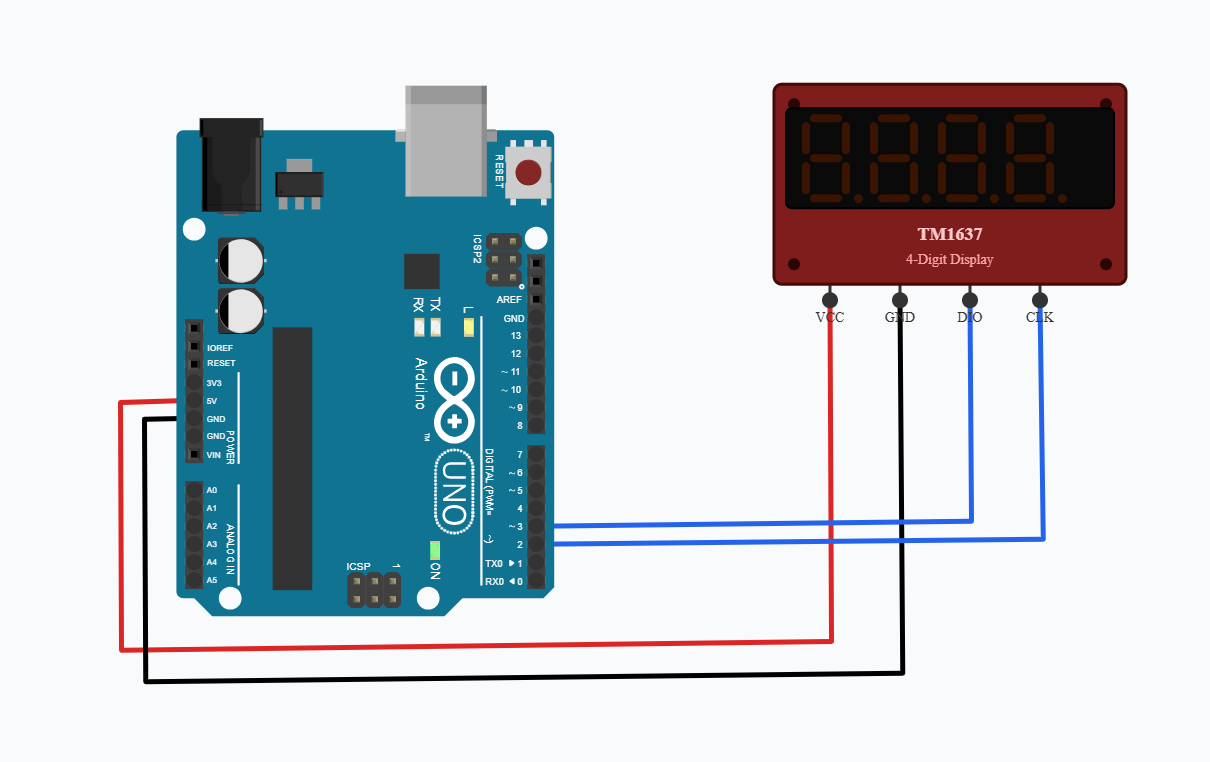
The Arduino communicates with the TM1637 display using the CLK and DIO lines. The display module handles the individual 7-segment LEDs internally, allowing Arduino to control four digits without requiring separate GPIO pins for every segment.
💻 Code
#define CLK 2
#define DIO 3

TM1637Display display(CLK, DIO);

void setup() {
  display.setBrightness(7);
}

void loop() {

  for (int number = 0; number <= 9999; number++) {

    display.showNumberDec(number, true);

    delay(100);
  }
}
💬 Comments (0)
Sign in to leave a comment.
Be the first to comment on this project.